Models
Signed up, pre-approved, approved, undecided, denied or withdrawn, with filters by status and location.
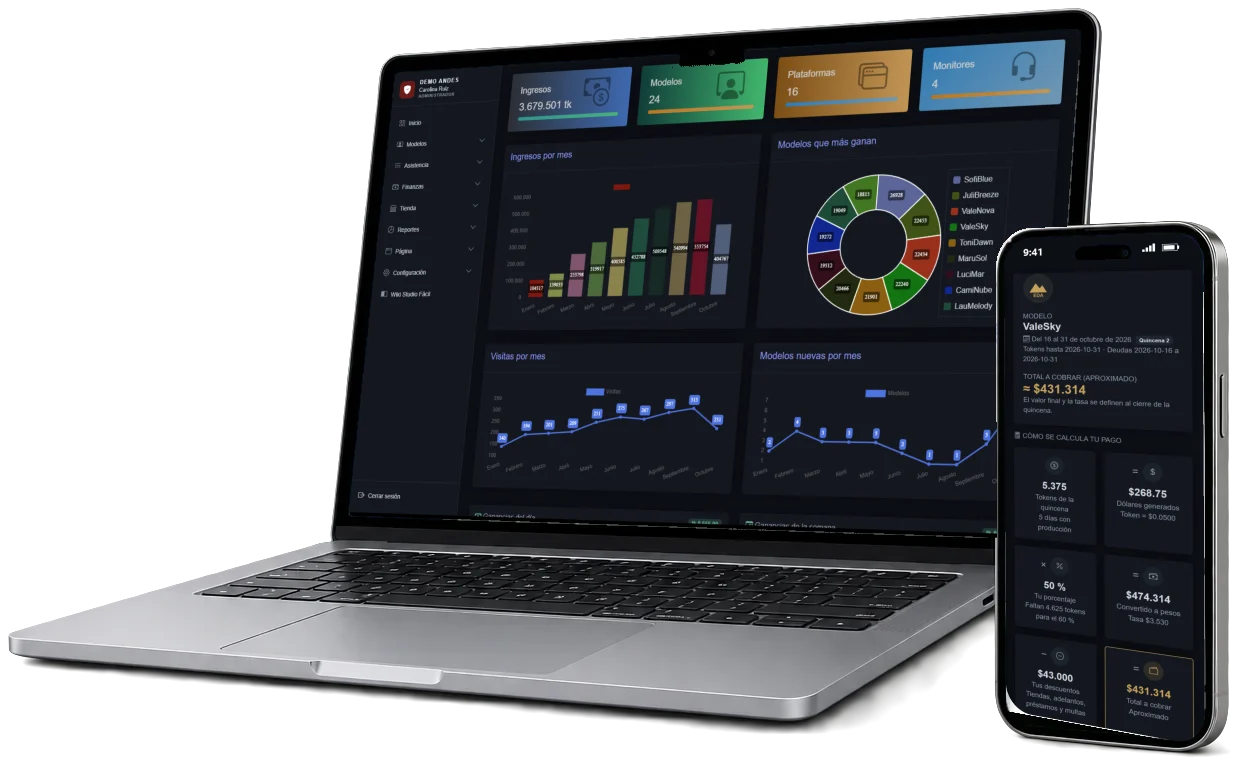
Models, monitors, shifts and sessions, attendance, earnings sheets and each model's payout, by tokens with a pay scale or in dollars by percentage, at the exchange rate, in one cloud system. No parallel spreadsheets or notebooks.
40-minute online demo, no commitment.
Companies that trust usStudios that already run their operation with Studio Fácil.



Drag the handle to compare how a studio is run today and how it runs with Studio Fácil: earnings, attendance, sessions, payroll and the shift.
| Model | CB | SC | C4 | Total |
|---|---|---|---|---|
| ValeSky | 1.240 | 860 | 310 | 2.410 |
| Lucía M. | 980 | 1.120 | 0 | 2.100 |
| Sara P. | 640 | 420 | 560 | 1.620 |
| Daniela R. | 1.050 | 0 | 390 | 1.440 |
| Total | 3.910 | 2.400 | 1.260 | 7.570 |
| A | B | C | D | E | |
|---|---|---|---|---|---|
| 1 | Modelo | CB | SC | Rate | $ |
| 2 | vale sky | 1240 | 860+310 | 3912 | 2.410 |
| 3 | ValeSky | 980 | 4,012? | 4012 | #VALUE! |
| 4 | lucia m | 640 | 420 | #VALUE! | |
| 5 | total | 2860 | #VALUE! | ||
| 6 |
One flow, no retyping: each step feeds the next.
Paso 1
The applicant signs up on the studio's website, her interview is scheduled and, once approved, her profile holds personal data, location, shift, payroll type, usernames by platform, contracts and documents.
Paso 2
The monitor or the administrator starts and ends each model's session. With auto-session, the system detects whether the model is live on Chaturbate, StripChat or CAM4 and opens or closes the session on its own.
Paso 3
The attendance sheet marks each model on the shift as on time, slightly or very late, absent or excused. When enabled, lateness creates the late-arrival fine and each absence in the period creates a fine larger than the previous one, according to the studio's catalog.
Paso 4
The monitor enters what each model makes on each platform in the earnings sheet, by shift and day. If the studio pays in dollars, the platforms' payment report is also uploaded in Excel and each income is assigned to its model by username.
Paso 5
By tokens, the system applies the pay scale for the tokens and model type and converts at the cut-off rate minus the spread. In dollars, it applies the fixed on-site or remote percentage, with withholding tax, and converts at each date's exchange rate. Either way it subtracts deductions, store installments, fines and loans.
Paso 6
By tokens, each model sees in her dashboard how her payout was calculated: her tokens day by day, the scale applied, her deductions and her balance. In dollars, she receives her PDF receipt by email and downloads it from My earnings. Fewer questions to the administrator and more trust.
Connected modules. You decide what each monitor, model and seller sees, and turn on auto-session and automatic fines when you need them.
Signed up, pre-approved, approved, undecided, denied or withdrawn, with filters by status and location.
The model's username on each platform, which feeds the earnings sheet and payroll.
Morning, afternoon and night with start and end times; the night shift crosses midnight without errors.
On time, slightly late, very late, absent, excused or not scheduled, with the minutes late.
One button shows the running total for the period, filtered by shift and model.
Token ranges with their percentage, different for on-site, remote or couple.
The report's accounts sheet is read automatically; income with an unknown username is left to be assigned by hand, and the username can be created right there.
Each installment of a sale to a model creates its payroll deduction; a monitor's purchase is recorded as their debt.
One location or several, on-site or remote models, with a store or without one: the same system is configured for your operation without custom development.
Each model's payout depends on what she made across several platforms, her percentage, the exchange rate and her deductions. Studio Fácil does that math the same way for everyone, by tokens or in dollars, with no formulas to break.
Knowing who arrived, how many hours each model worked and which fine applies shouldn't depend on a notebook. Studio Fácil records it every shift.
When a studio grows to a second location, its information splits in two. Studio Fácil keeps it in one system, and each user works with the locations in their charge.
A remote model isn't at the location, but her payout, deductions and hours matter just as much. Studio Fácil handles her in the same system, with her own rules.
Get organized from the first model: profile, shifts, earnings sheet and payroll, without relying on a spreadsheet only one person understands.
Sales to models, paid in full or in installments deducted from their payout; monitors' purchases recorded as their debt, and a cash closing every night.
Four dashboards with their own menu, and a permission matrix to decide what each profile sees.
Administrator
Revenue, top-earning models, live operations, payroll, deductions, statistics and settings for every location.
Monitor
Starts sessions, marks attendance, enters the earnings sheet and records fines. Does not see models' personal or financial data.
Model
Her period summary, tokens day by day, pay scale, deductions, hours for the week and chat with the studio.
Store
The seller records sales to models, monitors or outside customers, paid in full or in installments, and closes the register for the day.
What studios ask us most before getting started.
In the demo we go through a full period: sessions, attendance, earnings sheet and each model's payout, by tokens or in dollars.